
If you are running marketing or technical operations for an IT services firm or a SaaS platform, you have likely seen the acronyms LCP, INP, and CLS inside your Google Search Console.
For a long time, page speed was treated like a minor design checklist item or a “nice-to-have” engineering metric. But Google’s core ranking updates have drawn a sharp line in the sand. Today, Core Web Vitals (CWV) are no longer just technical benchmarks. They are actual real-user ranking signals and foundational pillars for Generative Engine Optimization (GEO). Simply put: if your site fails these metrics, it risks being left out of AI-driven search overviews and organic top positions.
Worse yet, data shows that over 47% of websites fail Google’s thresholds. When an IT or SaaS site struggles with performance, it doesn’t just lose SEO real estate—it directly drives away high-value leads and pushes down trial sign-ups.
/
The 2026 Core Web Vitals Framework
Google doesn’t care how fast your website loads in a perfect “lab” testing environment. It looks at field data—the actual, messy, real-world experiences of real users navigating your site on mobile data and varying hardware.
The three core metrics focus on three simple questions: Does it load fast? Is it responsive? Is it stable?
The Hidden Revenue Killers for IT & SaaS Sites
Most B2B tech sites suffer from unique performance bottlenecks. Because these websites rely heavily on complex integrations, they regularly struggle with two specific metrics:
1. The Interaction to Next Paint (INP) Trap
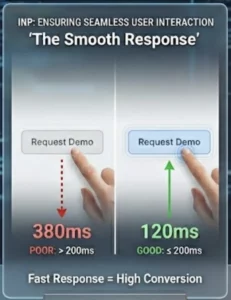
INP completely replaced the old First Input Delay (FID) metric to measure responsiveness across a visitor’s entire session, not just their first click.
If your SaaS landing page is weighed down by heavy JavaScript frameworks, client-side hydration, or tracking pixels, your INP will spike. When a prospect clicks your interactive pricing calculator or attempts to open a feature dropdown, a laggy 400ms delay makes the app feel broken. That friction kills conversion rates before the lead even enters your pipeline.
2. Cumulative Layout Shift (CLS) from Dynamic Content
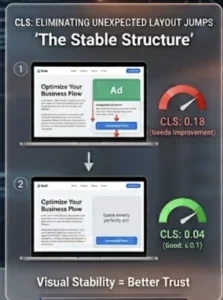
Many IT and SaaS sites dynamically inject cookie consent banners, promotional trial alerts, or live-chat widgets. If you do not explicitly reserve space for these elements in your CSS, they will push your main content downward when they load late. This high CLS score signals a poor user experience to Google and disrupts users who are actively reading your case studies or documentation.
A Proven Optimization Workflow for Tech Sites
Optimizing site speed shouldn’t involve guessing or wasting engineering sprints. To see real downstream ranking and conversion wins, follow this structural execution order:
Stop Guessing. Let’s Fix Your Performance.
A faster, more stable technical infrastructure translates directly into higher conversion rates, longer session times, and a clear competitive advantage in organic search. If your internal team doesn’t have the specialized technical SEO expertise to unpack complex JavaScript blockages or server latency, we can handle the heavy lifting.
At Virtual Digital Marketing, we specialize in advanced technical SEO and performance optimization engineered specifically for IT and SaaS businesses. We will audit your field data, resolve your Core Web Vitals bottlenecks, and ensure your site is completely optimized for search engines and AI engines alike.
Get a comprehensive technical performance audit today:
-
Email: clients@virtualdigital.online
-
Phone/WhatsApp: +27 847337127


